Assigning Universal IDs
In the previous section we saw a high-level overview of what an EMPI software system is and of how Tuva EMPI works. One of the key steps in the Tuva EMPI data flow is the assignment of universal IDs to all records (step 4 in the previous section). In this section we drill into that process to offer more detail of how universal patient identifiers are created by Tuva EMPI.
There are 3 key components required to assign universal patient identifiers to patient records:
1) Record Matching
The first step necessary to assign universal patient identifiers to all patient records is to do a pairwise comparison of all relevant records and determine if any given pair of records corresponds to the same real-world person. This may be done in a deterministic way or in a probabilistic way.
For instance, one may come up with deterministic rules: when certain criteria are met, a given pair of records is determined to correspond to the same real-world person. This gives rise to a binary result: any given pair of records either corresponds to the same real-world person (when the predefined criteria are met) or it doesn't (when the predifined criteria are not met). For example, one might choose to implement a rule where two records are determined to belong to the same person if the two records have the same date of birth, gender, and last name. In any situation when two records are compared and those criteria are not satisfied, the two records are determined to belong to different real-world people.
Another approach is to use a probabilistic approach when comparing any given pair of records. The problem is reduced to creating a function F that takes two patient records as inputs and returns the probability that those two records correspond to the same real-world person:
F(R1, R2) = P,
where R1 and R2 are two distinct patient records and P is the probability that R1 and R2 correspond to the same real-world person.
Tuva EMPI uses a probabilistic approach when comparing pairs of records. We use an open-source algorithm from the Splink Python package. In the backend, Tuva EMPI runs a Splink model to compare all relevant pairs of records and compute the probability that each pair corresponds to the same real-world person. The user must configure the Splink model appropriately for their data. This is typically done manually in a notebook. There is an excellent introductory tutorial walking through how to setup your Splink model, but the most important key ideas to get started are the following:
-
Start with exploratory analysis on your data. Remove fields with a high percentage of null values from your analysis. Look out for fields that have a large skew in their distribution of values; for such fields it might be helpful to use
term_frequency_adjustmentsto improve the peformance of your model. -
Choose blocking rules to optimize runtimes. We could compare every possible pair of records in our raw data and calculate the probability that each possible pair corresponds to the same real-world person, but that would result in N(N-1)/2 comparisons, which grows as the square of the number of records in your dataset and results in a prohibitively large number of comparisons for large datasets. We get around this problem by defining so-called "blocking rules" to limit the number of comparisons made.
Once you have setup your Splink model for your data, you may load it to the Tuva EMPI application using the Tuva EMPI API. The Splink model is used to do pairwise comparisons of all relevant records (as determined by your blocking rules) and calculating the probability that each pair corresponds to the same real-world person.
The next key components required to assign universal patient identifiers to patient records is the following:
2) Person Creation Algorithm
The next key component we need to assign universal patient identifiers to
patient records is a person creation algorithm. Note that after having
done record matching (as described above, for the first key component),
all we have is a table that compares all relevant pairs of records and
lists the probabiliy that each pair corresponds to the same real-world person:
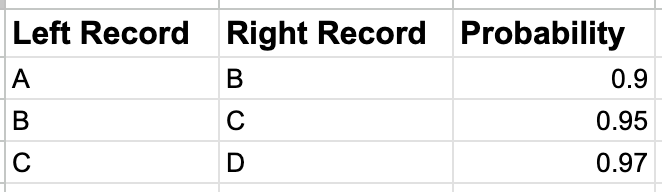
This list of probabilities alone is not of much help by itself. What we need next is an algorithm that can link together all records that are connected to each other through a chain of high probabilites into a single person identity and assign all those records a common person_id. For example, the table above tells us that:
- Record A and record B represent the same real-world person with 90% probability
- Record B and record C represent the same real-world person with 95% probability
- Record C and record D represent the same real-world person with 97% probability

We need an algorithm that can:
- Traverse this chain of linked records and determine that records A, B, and C all represent the same real-world person.
- Create a new universal patient identifier (
person_id) and assign it to the new person identity composed of records A, B, and C.
Mathematically, what is happening here is that we are using an equivalence relation (i.e. the relation of two records having high probability of representing the same real-world person) to partition a set (the set of all records) into equivalence classes (each equivalence class is the set of all records that represent the same real world person). This person creation algorithm is part of the Tuva EMPI application.
Finally, the last key component needed to assign universal patient identifiers to patient records is a
3) UI where people can review, edit, and approve matches
After we have grouped records into person identities, we need a UI where users of Tuva EMPI can review, edit, and approve matches before pushing the final universal patient identifiers into production. Tuva EMPI comes with a UI where a user can do this. Two types of matches can happen with Tuva EMPI:
-
Auto-matches: These are groups of records that are determined to represent the same real-world person with high probability, so they are automatically given the same
person_id. -
Potential-matches: These are groups of records that could potentially represent the same real-world person, but the probability of this being the case is not high enough to justify automatically linking the records, therefore a human-in-the-loop must review this potential match before the records are linked into a single person identity.
Users of Tuva EMPI can review both auto-matches and potential-matches and they can edit persons by easily dragging and dropping records from one person identity to another.